Changelogs
Stay up to date with the latest changes and enhancements.
Stay up to date with the latest changes and enhancements.

03. Jul 2026
Share
 New
New
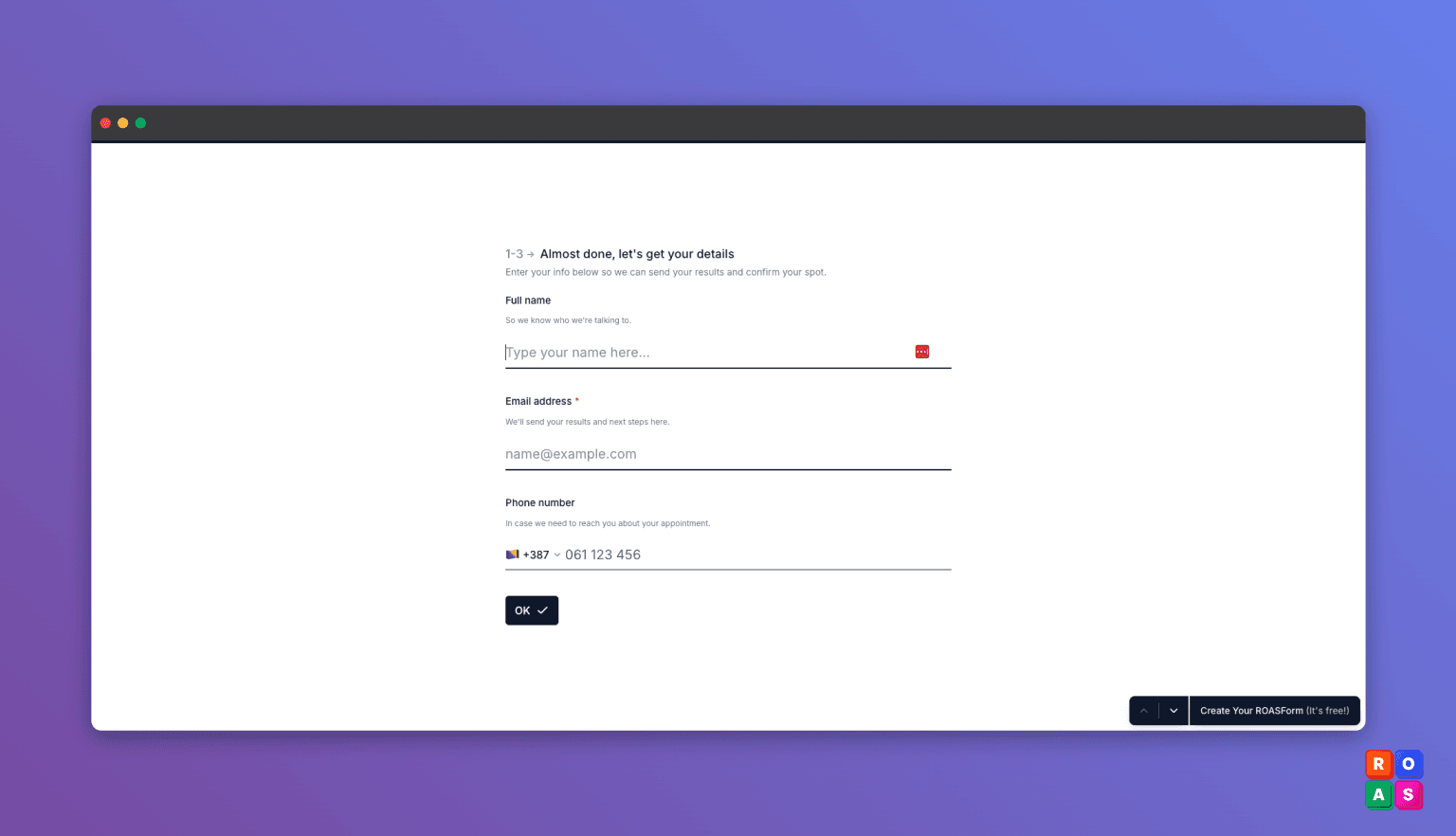
Contact Info card
Show more than one question on a single step, so you can group related fields (like name, email, and phone) onto one page instead of one per screen.
Where to find it: in the form builder, add the "Contact info" element.
Manually qualify your leads
Update a lead's qualification right from the submission view. When you know a lead better than the automatic scoring does, mark them qualified or disqualified yourself. Soon, you’ll be able to manually fire the Meta CAPI too.
Pass booking details into your redirect URL
Add the appointment details (start time, duration, timezone, lead score, qualification status, & more) to your redirect link, so you can pull this data and display it on your thank you page.
For example: Your call is booked On January 10, 5PM EST.
Where to find it: In the form builder, open Settings, then go to the URL Redirects tab, and click Append Booking Data.
 Improved
A cleaner, faster calendar
We polished the calendar booking experience for a smoother, better-looking flow when your leads pick a time. Fixed
Fixed
• You couldn't remove an owner from a subaccount. Fixed.
• Validation error text is now readable on every theme, and you can set the error color yourself (form design, Colors section, Error).